
Weld Inspector
An Android app for the weld inspector. At the weld it times the run and works out arc energy and heat input, records the visual inspection with its photos, and keeps NDT reports and repairs with the weld. Before acceptance it lists everything still missing, and the decision is always yours, never the app's.
- Android 6.0+
- Works without internet
- No account or subscription
- English and Polish
- Light and dark theme
The short path at the weld
The Start screen opens on the current project, the inspector whose name goes on each result, and where you left off. Most of the work at a weld is one of these four.
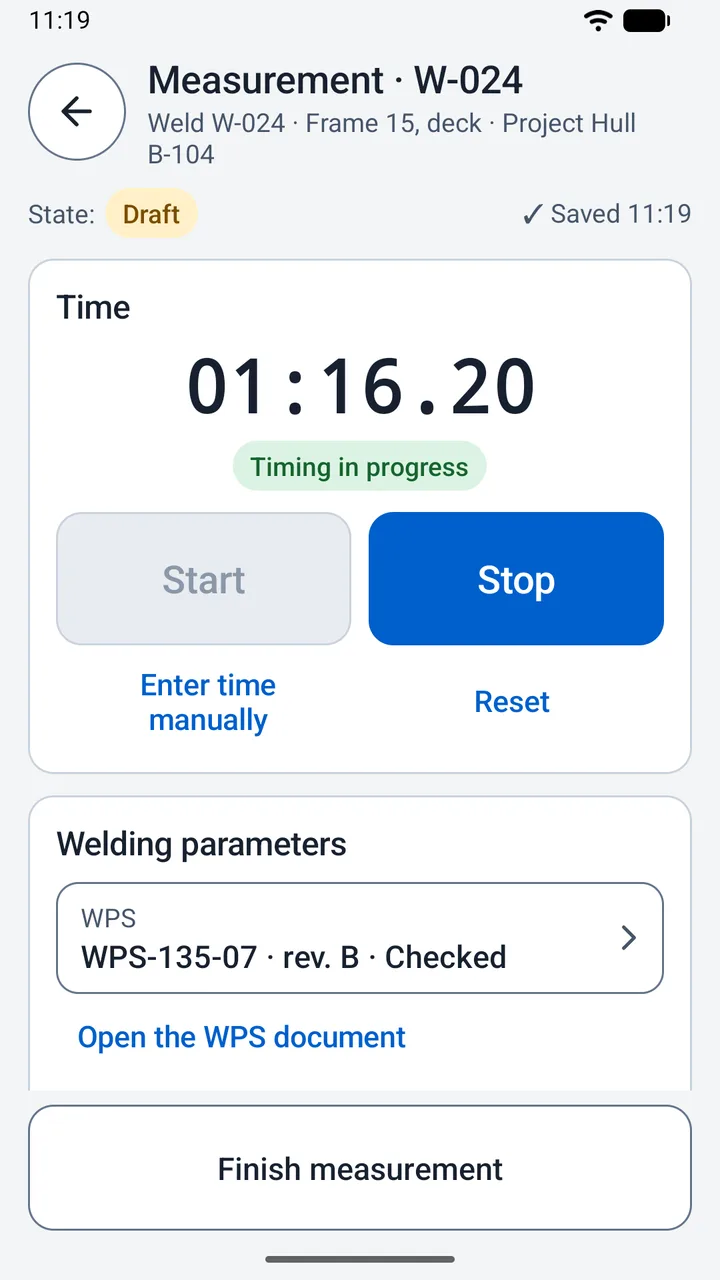
- Measure the run. Tap New measurement and pick the weld from the project, or just type its number, such as 3456 or 1007-R1. Start and Stop time it in minutes, seconds and hundredths. Stop is a pause: Resume carries on, with Reset and Enter time manually beside them. Type the current, voltage and length with a comma or a dot, and set the efficiency with one tap, 0.6, 0.8 or 1.0, or type it. Finish measurement stops the clock first, then shows a summary to confirm.
- Look at the weld. On the weld card, Quick VT inspection comes filled in with the stage, after welding, the scope, the whole weld, and the criterion you used last. No remarks is two taps, the button and a confirmation. Nonconformity and Cannot assess open the same form, filled in, for the indication or the reason. Whatever a result still lacks is listed all at once, under Still to fill in.
- Take the photo. Take photo is there on a weld, a measurement and an inspection, and brings you back to the same screen. A copy goes to the phone's gallery, in
Pictures/WeldInspector, named after the weld and the day with a two-digit counter, such as1007-R1_03102026_01.jpg, the date in the order your phone's region uses. - Decide on acceptance. The weld card opens with Readiness for acceptance: every gap at once, each one a button to whatever closes it. Record acceptance decision stays grey until the list is empty. The app checks that the saved data is complete; the decision it records is the inspector's.
The stopwatch belongs to its measurement. It keeps counting when you go back, switch apps or lock the phone, the screen stays on while it runs, and every other screen shows a Stopwatch running bar with Open and Stop. If the phone restarts mid-run, the app keeps the last time it can vouch for and asks you to confirm it rather than guess.
How the result is worked out
- Travel speed
- v = L / t
- Arc energy
- E = U × I / (1000 × v)
- Heat input
- Q = η × E
I 180 A · U 22 V · L 300 mm · t 150 s · η 0.8
v = 2 mm/s · E = 1.980 kJ/mm · Q = 1.584 kJ/mm
A weld has no single OK
Weld Inspector keeps apart what the inspection found, what has been tested, what is under repair and whether anyone has accepted the weld, and every entry names its state, in words and in colour. A finished result is locked: changing it takes a correction with a reason, and the original stays in the change history. The archive hides an entry without deleting it, and an indication in the archive still holds up acceptance.
Projects
A project holds the requirements its welds are judged by: the application scope, the requirements document and its edition, and the NDT methods every weld needs, from VT, PT, MT, UT, RT, ET and LT, or NDT not required, with the reason. Nothing is selected for you and no acceptance thresholds are built in. They come from your project documents, and someone marks them as checked.
Welds
Created from their number, with a warning before a second weld of the same number. Location, joint type, welder by number or stamp, material and WPS. The list searches by number, location or welder, and each row names the first thing still missing. A new result on an accepted weld warns you first, then sends it back for a new decision.
- Open
- Accepted
- Acceptance to be re-decided
Measurements
Every measurement is kept, finished or not, and a new one never overwrites a draft. The welding process, the pass, the WPS revision and the interpass or preheat temperature can go with it, and each one keeps the WPS ranges it was assessed against.
- Draft
- Finished
Visual inspection (VT)
The stage, before welding, after welding or after repair, the inspected scope, the whole weld or a described section, the acceptance criterion, the date and the inspector. Indications carry their kind, position and dimensions, and checkpoints carry a reading and the instrument.
- VT clear
- VT: nonconformity
- VT: not assessable
NDT
A test moves from planned to ordered, performed and report attached, then gets its assessment, with the report taken from the project's documents. Only a test of the whole weld, accepted and with its report, meets the project's requirement for that method.
- Planned
- Ordered
- Performed
- Report attached
- NDT: accepted
- NDT: rejected
Repairs
A repair starts from a nonconformity or a rejected test, names the indications it deals with and goes step by step: the description, the execution, VT re-inspection of the repair area, NDT after the repair when the plan asks for it, and closing.
- Repair open
- Awaiting VT re-inspection
- Repair closed
A name in the app is the one the inspector typed in Settings. It records the author's declaration and is not an authenticated electronic signature.
Documents, drawings and notes
WPS, drawings and reports are prepared before you go out, added to a project as PDFs or photos, and opened on the phone wherever you are.
Documents
Each one has a kind: WPS, drawing, NDT report, requirements document or other. Compare it with the paper and confirm the check, and it is locked. A change makes a new revision, with a reason, and the welds on the old WPS revision are offered the new one.
WPS ranges
Copy the ranges for current, voltage, arc energy or heat input and temperature from the WPS, and every measurement shows Within checked limits, Outside limits or No automatic assessment. A parameter without a range is not assessed, and the app suggests no values of its own.
Drawings
Two fingers to zoom, drag to move, a double tap to zoom in or fit. Choose a weld and touch the drawing where it is to leave a marker; touching a marker opens the weld card.
Marks on a copy
Freehand lines, arrows and circles in black, red or yellow, thin or thick, drawn on a copy of a photo. The original stays as the camera took it.
Voice notes
Up to ten minutes each, recorded with the screen kept on and played back in the app, next to the typed note.
QR labels
A label for each weld: its QR code with the number under it, saved as a picture to print. Scan it with the camera, or pick a picture of it, and the weld card opens.
Reports, tables and backups
Three kinds of file, each saved where you choose and shared from there if you like: reports to read, tables for a spreadsheet, and one backup that holds everything.
PDF reports
A report of a weld, with its VT inspections, NDT tests, repairs, measurements, photos and whatever is still missing, and a report of a single measurement. Until the weld is accepted its report is headed as a working report, not an acceptance.
CSV tables
Welds, VT inspections and measurements as three tables in one ZIP, for one project or everything, with a decimal comma for Polish Excel or a decimal point. The other way round, a project's welds come in from a spreadsheet: save the register template, fill in number, location, material, welder and WPS, and import it. Welds already in the project are skipped and named.
Full backup
One ZIP with every project, weld, measurement, photo, document and the whole change history. Data can only be restored from it, so keep it off the phone, on a computer or a USB drive. Before a restore the app checks the file and shows what is in it, and afterwards the data from before is one button away.
A backup is also how the work moves to another phone, whole. Two phones do not sync and the app does not merge copies edited on both, so agree which one carries on.
Screenshots
Sample data. Click a screenshot to make it larger.
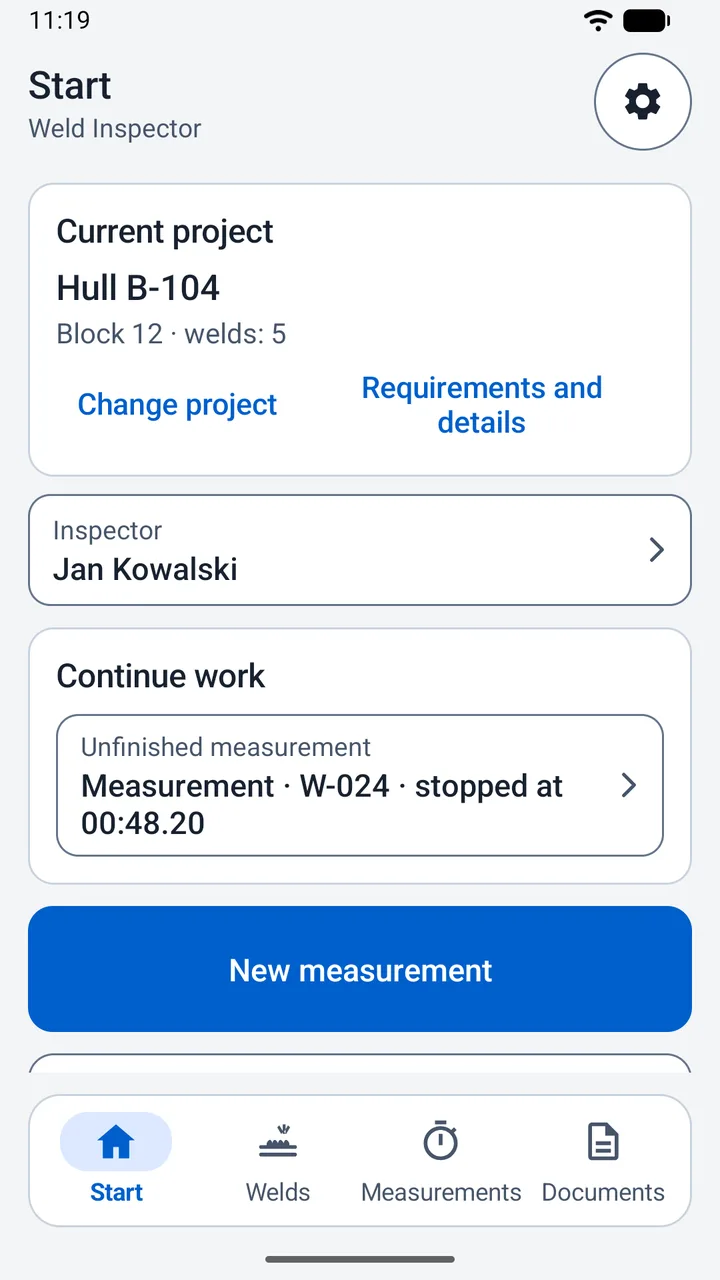
Start: the current project, the inspector whose name goes on each result, and a measurement stopped at 00:48.20, one tap from carrying on. 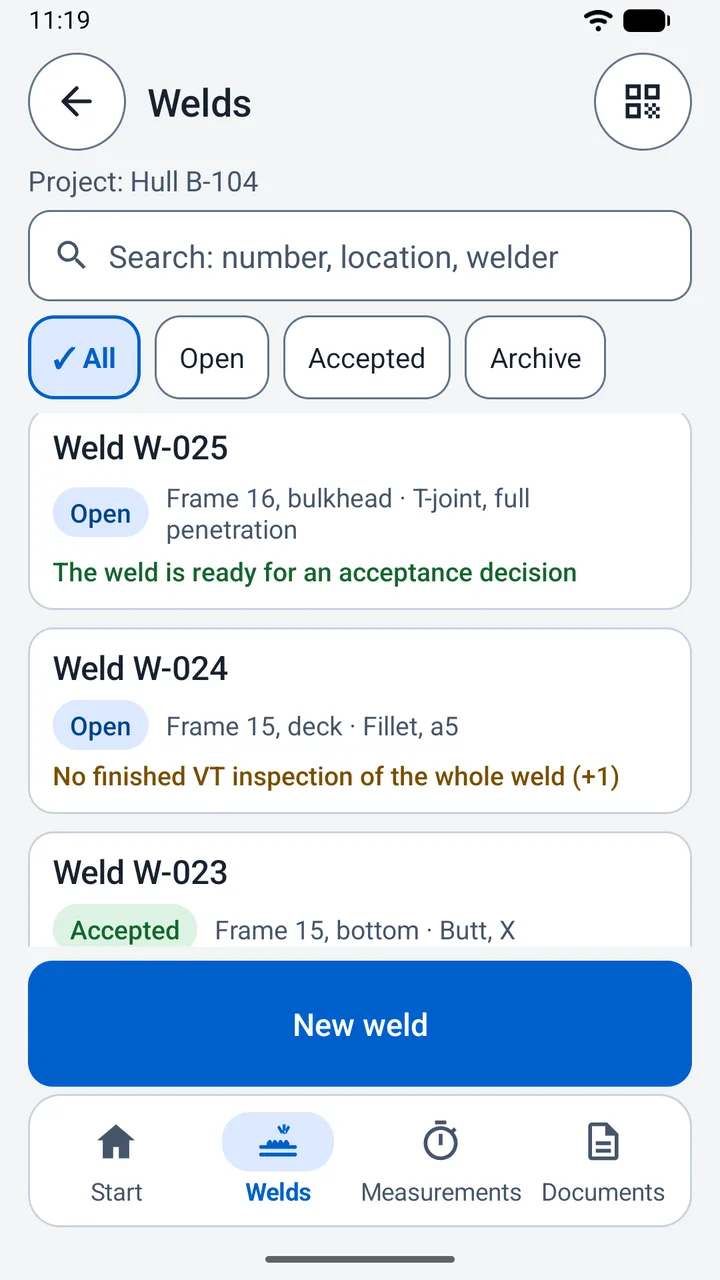
The welds of a project. W-025 is ready for a decision, W-024 still lacks a finished VT inspection of the whole weld and one more thing, and W-023 is accepted. 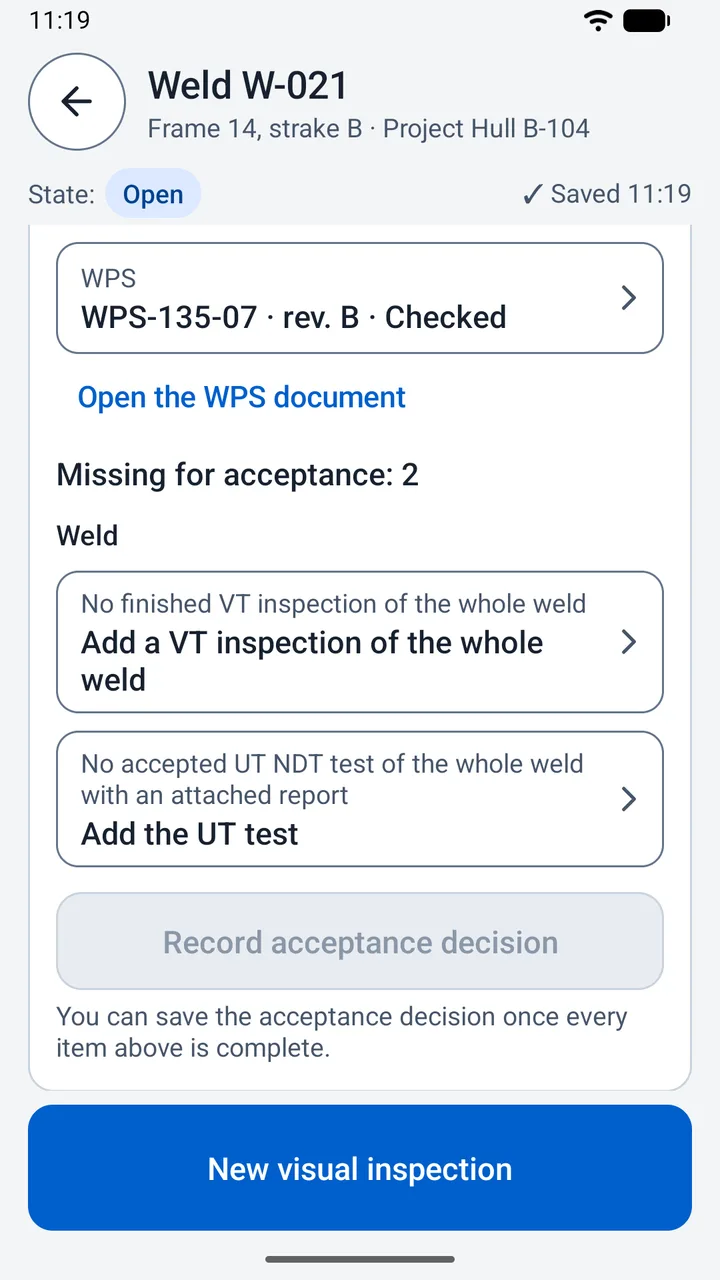
W-021 is missing a VT inspection of the whole weld and an accepted UT test with its report. Each line opens what it needs, and the decision waits for both. Timing a run on W-024, with the weld's WPS a tap away. Finish measurement turns blue once the values are complete. 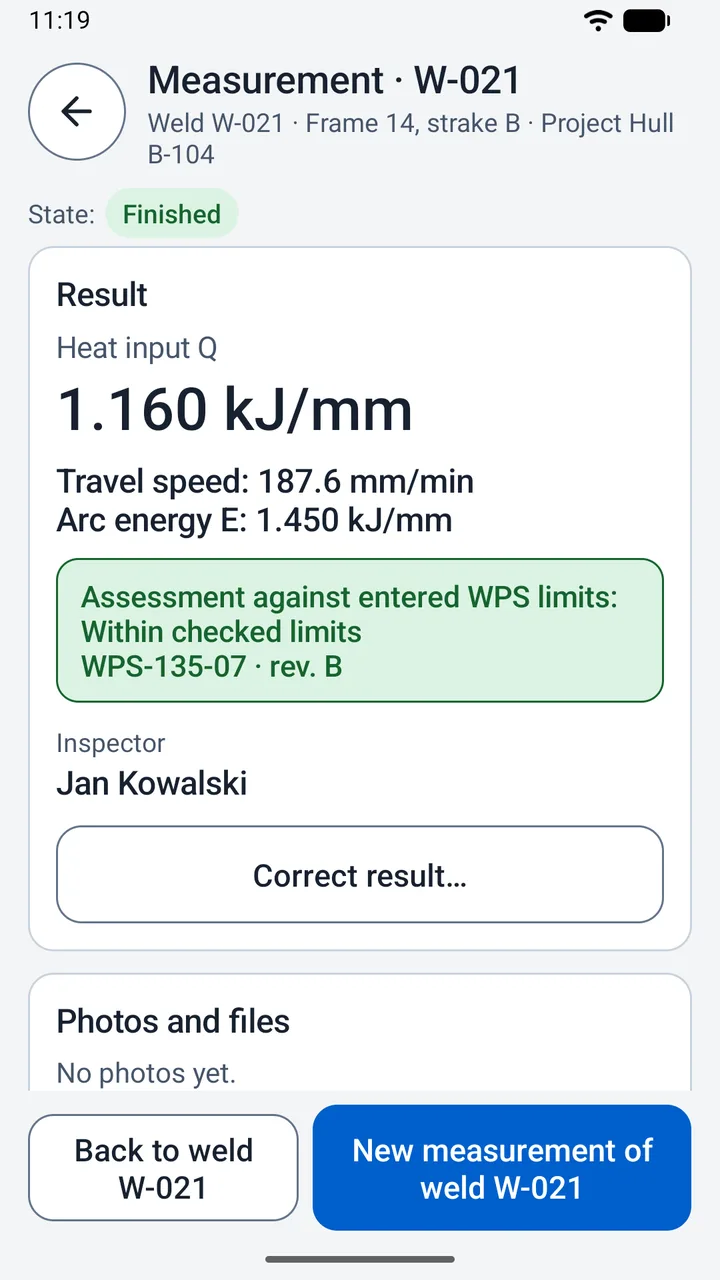
A finished measurement: heat input, travel speed and arc energy, held against the ranges entered from WPS-135-07 rev. B. From here on, a change is a correction with a reason. 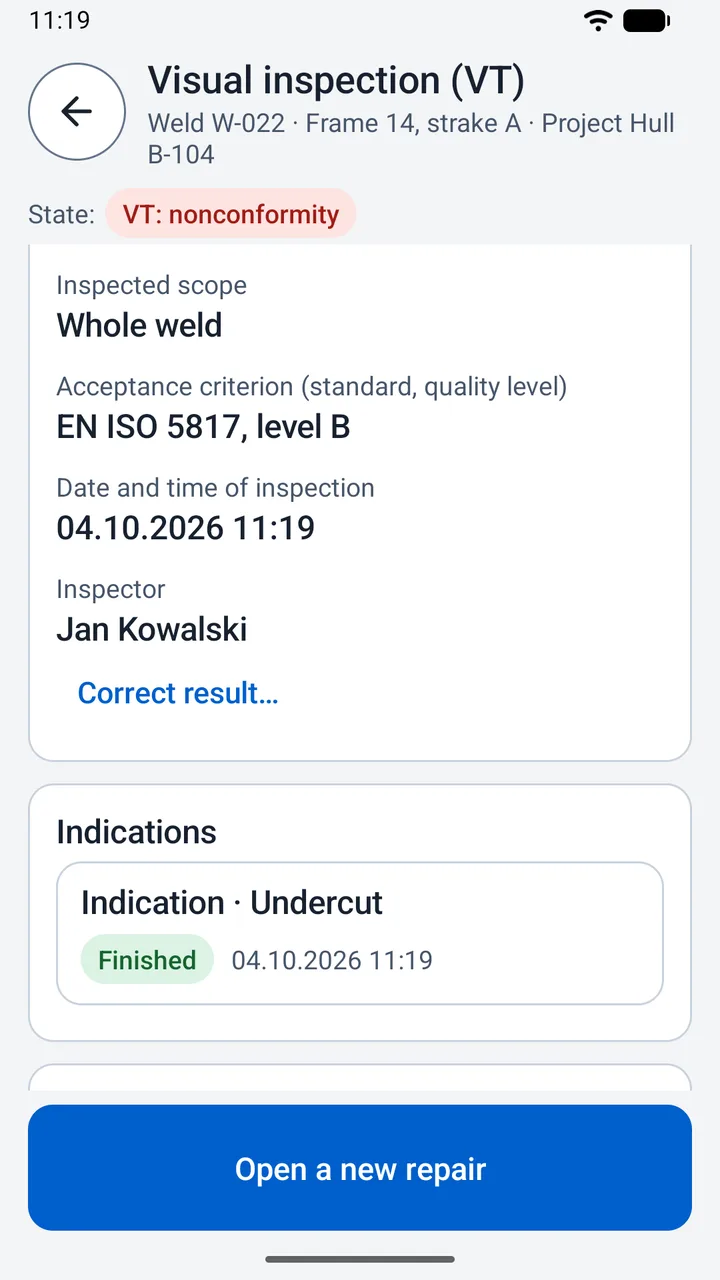
VT of W-022 against EN ISO 5817, level B, with an undercut. A nonconformity leads straight on to a repair. 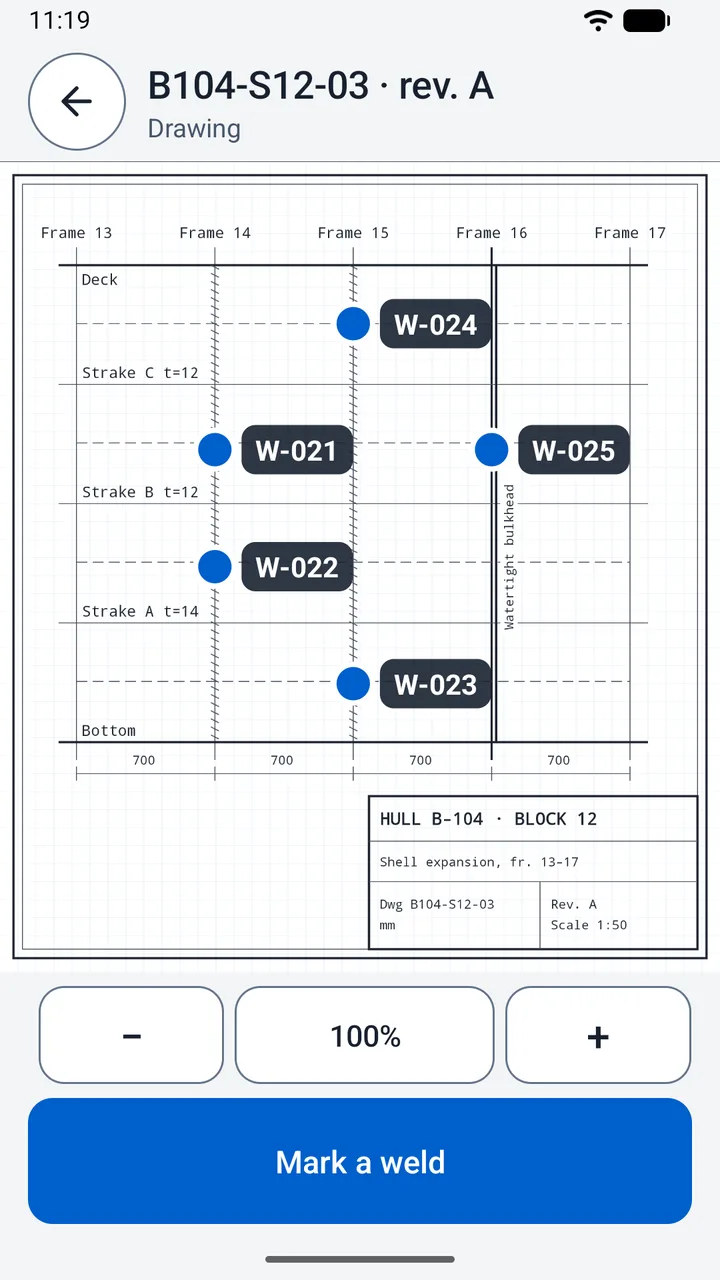
A shell expansion drawing with weld markers. Touch one and its weld card opens; Mark a weld adds another. 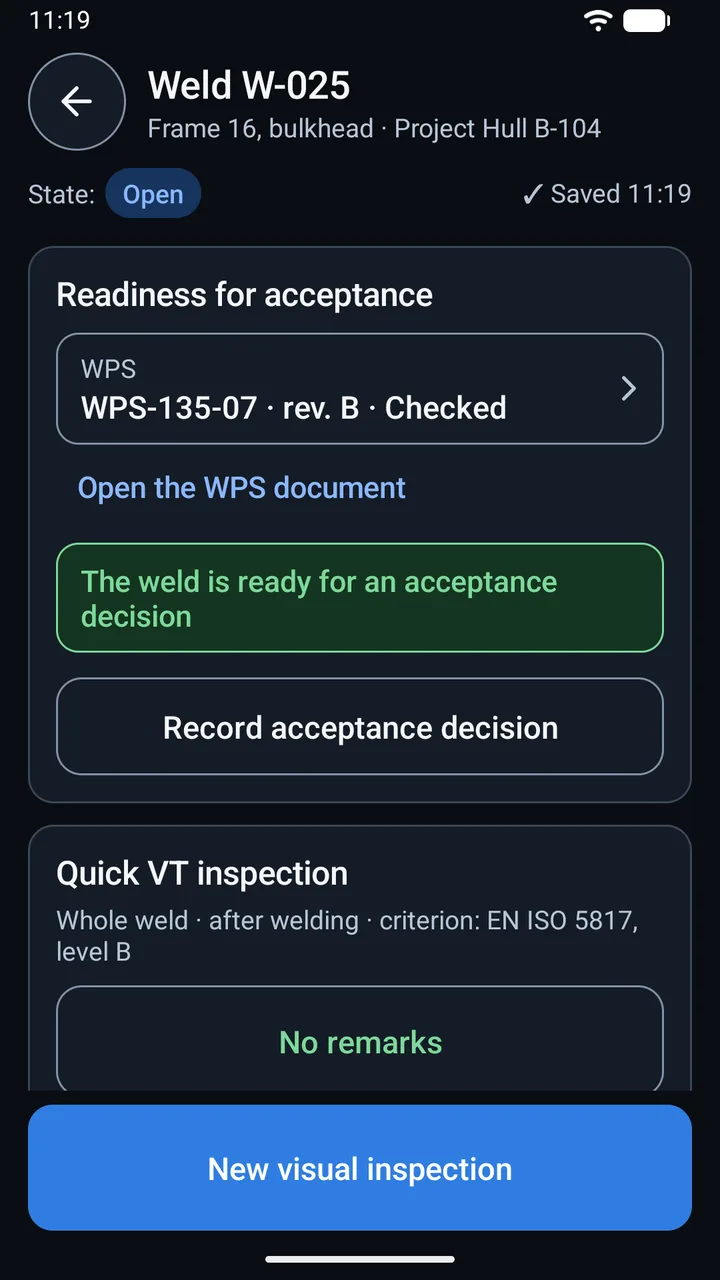
The dark theme, for dim spaces. W-025 has nothing missing, so the decision can be recorded, and Quick VT inspection is one tap away.
Details
- Privacy
- No account, and it works without internet. Privacy policy
- Handling
- Big buttons with words on them, the main action at the bottom of the screen, and a comma or a dot in any number. The phone gives a firm pulse for Start, Stop and Finish and a double one for an error, and vibration can be switched off.
- Units
- Current in A or kA, section length in mm, cm or m, travel speed in mm/min, mm/s or m/min, energy in kJ/mm or kJ/m, and a default efficiency of 0.6, 0.8 or 1.0. A change applies to new measurements and to how results are shown; saved values stay as they are.
- Language and theme
- English and Polish, following the phone: Polish on a Polish phone, English on any other. The theme is light, or dark for dim spaces, and follows the system on Android 10 and newer. Both can be set in Settings.
- Scope
- Readiness for acceptance is built for steel hull structures. Other work can still be documented in the app, by hand. Requirements, criteria and WPS ranges always come from your own documents.
- Devices
- Android 6.0 or newer, on phones. Current version 1.0.0.
Get it
Weld Inspector is coming to Google Play for Android phones. The store link goes here as soon as the listing is live.
Questions about the app or its privacy policy: google@tomaszd.eu